Fixing autocomplete issues with Typescript in VScode
I ran into an issue recently where my autocomplete suggestions on VSCode would only bring up Emmet suggestions and none of the type information would be suggested in autocomplete.
After digging through VSCode settings for a bit, figured out that you can enable the following settings to fix this issue:
Press
Cmd + ,to enter VSCode settingsSearch for
autocompleteEnable
Typescript > Suggest:Enabled
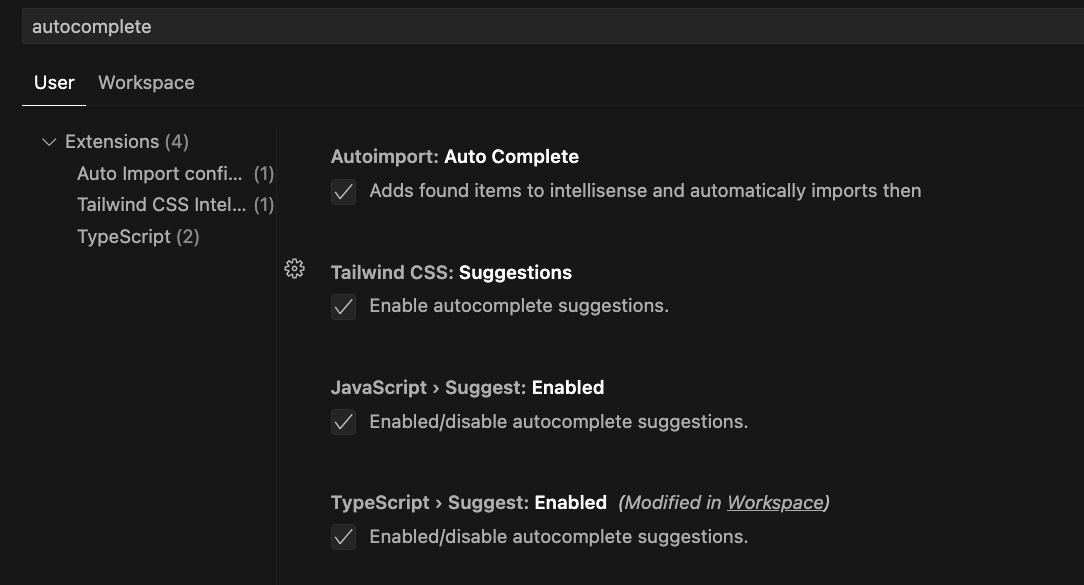
Cheers!
About the author
As a Senior Principal Engineer at CVSHealth, I specialize in building and optimizing cvs.com to deliver a superior guest experience. Using the latest web technologies, my team and I work diligently to create a user-friendly and intuitive platform that exceeds expectations.
Comments
Join the discussionNo comments yet. Be the first to comment.